
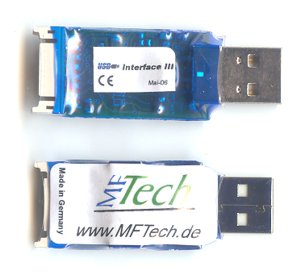
R/C USB-Interface III for flight simulators
Technical data
-
It can be used by modern notebooks equipped without gameport.
-
Supports USB 1.1, USB 2.0, Hot-Plugging and is powered by USB
-
Works with all transmitters: Though easily exchangeable transmitter cords, you can use one USB-Interface with different transmitters
-
Up to 8 R/C channels are transmitted to the PC. Consequently, you can also control flaps, retractable landing gear, .. in suited simultators with the R/C transmitter.
-
The USB-Interface II is programmable: Assignment of axis and buttons, reaction of buttons can be reprogrammed quickly and easily.
-
ast and precise digitalization with 256 steps
-
flashing control LED
-
New, smaller package: It has the size of a memory stick and is plugged directly into the USB port. If your USB port is difficult to access you can use an USB extender cable.
-
Other approved features are unmodified.
-
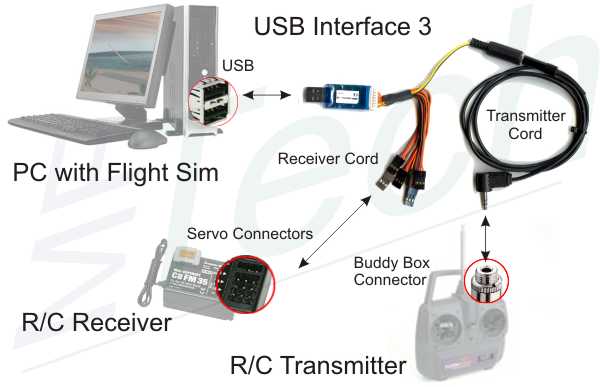
It can be connected with an R/C receiver. So a transmitter without buddy box or PPM signal can be made suitable for simulators. The USB-Interface supplys the receiver with power. It reads up to 7 R/C channels from the receiver.
-
Optionally, a transmitter cord can be connected with the receiver cord. The USB-Interface III is used with the R/C transmitter just like USB-Interface II. The source of the signal is detected automatically.
-
It has a 16 pin connector and its firmware is updatable. So it can be used as generic device for monitoring, sensor measurement, controlling, as USB dongle, migrating applications to USB, PPM analyzer, training, prototyping, ...
-
The Software Development Kit - USB-Interface III SDK is offered for free. It supports the development of new applications. Examples can be found in the Forum, e.g. PPM Generator (controlling a model via PC)
-
More information: data sheet usb-int3_datenblatt.pdf [180kB]
Compatibility
After having installed the HID-driver (HID-driver, Windows included), the USB Interface is instantly ready for operation on Win98 SE, WinME, Win2000, WinXP (instruction manual usb-interface_en.pdf [210kB]), LINUX, Mac OS X (Screenshots osx.pdf [280kB]), .. (in general: all O/S that support HID USB joysticks). It has a 2m cable and works with nearly all R/C transmitters equipped with a buddy box.The USB Interface works with most R/C simulators that can be controlled by a normal joystick:
|
|
Connectivity
Programming tool for RC USB-Interface II
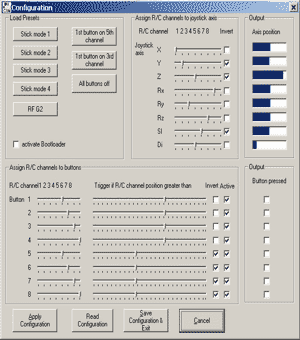 |
The Interface is programmed with IntCon. The Assignment of axis and buttons can be chosen freely. The program runs on Windows 98 to Windows XP. This software and a brief instruction manual is here: software |
transmitter cord
The USB-Interface hard- and software is designed to work with all transmitters.
Receiver Cord
The USB-Interface 3 is connected with the servo connectors of R/C receivers or a transmitter cord via these receiver cords.
|
 260 kB],
 260 kB],
 260 kB]